xapple2 - Apple II+ and //e Emulator for UN*X and Linux
This page points to an alternate build of version 0.7.4 of the xapple2 emulator which was originally created by Alexander Jean-Claude Bottema and updated/maintained by Stephen Lee, Aaron Culliney, Michael Deutschmann, and Tom Lear.
Version 0.7.4 of xapple2 comes in a file called "apple2-emul-0.7.4.tar.gz". Search for this using Google or Bing. I have found it in multiple locations, but the older ones are gone. Here are some locations1 where I have found apple2-emul-0.7.4.tar.gz in the past:
ocis.net (gone in 2011)
Here is the patchfile to make my improved version.
This version of xapple2 was modified by Robert Munafo to produce sound through /dev/audio, which on most modern Linux systems is linked through a driver to the sound card.
It also includes a much more accurate set of colors. The Hires "orange" and "blue" were particularly bad in the official version. I calculated the exact RGB values of the Apple ][ colors using the NTSC coordinate transforms, as explained on my Apple II Colors page.
Advantages of /dev/audio output:
- Precise pitch. All sounds, from the bootup BEEP to music programs to games to elaborate stuff like the Software Automated MouthTM sound exactly like a real Apple ][. I've tried dozens of different types of sound programs on my real Apple //c and the emulator, and it's perfect every time.
- No need to fiddle with F9. If you like running at "full speed" (accessed by hitting F9 once after starting the emulator), you no longer have to go back to "slow" speed when you do things that involve sound. The emulator automatically slows to exact Apple-II speed whenever sound starts playing. It accomplishes this by counting the exact number of 6502 clock cycles that are emulated and writing a corresponding number of bytes to the sound output — the blocking nature of the fwrite() to /dev/audio takes care of the rest.
- No wasted CPU bandwidth. (This is a corollary to the previous point) When you rely on the "speed" setting to control the speed of emulation, you're really just making your computer waste a lot of time in a delay loop; this interferes with the responsiveness of other tasks. The new sound method allows you to run at full speed (by pressing F9); even when sound is playing it regulates its speed through the IO calls (kernel blocking).
- Multitasking and VM do not interfere with emulator sound. With "PC speaker" sound, you hear glitches whenever anything else happens on your system (including X windows, kernal daemons, etc.) This made it nearly impossible to get good sound even when the speed was set properly. /dev/audio sound doesn't have that problem, because it's buffered and played by an interrupt routine or by a coprocessor chip.
Disadvantages of /dev/audio output:
- Sound delayed with respect to emulation. This happens on my system because the buffer on my sound card holds about 2 seconds worth of audio. I'm looking for a way to fix it. I know that some programs, like MP3 players, have displays that are synchronized with the sound output; I just have to find out how they accomplish the synchronization.
- /dev/audio is exclusive access. This means you can't use another sound program (e.g. MP3 player) and get sound from the Apple II emulator at the same time. Whichever you run first will win. I'm also looking for a workaround for this — I know it's possible for multiple programs to play sound at the same time.
To get the /dev/audio version of xapple2:
- get the real xapple2 from the FTP site listed above or from another location. Make sure it's version 0.7.4.
- Unpack the tar file.
- Get the patchfile: apple2-emul-0.7.4-rpm.diff and save it in the same directory you saved the tarfile. Make sure it's called apple2-emul-0.7.4-rpm.diff.
- gunzip apple2-emul-0.7.4.tar.gz if necessary
- tar xvf apple2-emul-0.7.4.tar
- mv apple2-emul-0.7.4 apple2-emul-0.7.4-patched
- cd apple2-emul-0.7.4-patched
- patch -Ep1 < ../apple2-emul-0.7.4-rpm.diff
- Then proceed with the normal build process:
- ./configure
- make
- make install
- to use /dev/audio output, change your "sound" line in ~/.apple2 to "sound = on" or "sound = /dev/audio" or "sound = autodetect"
- When you launch the emulator it will try to access /dev/audio. If it can't and if you picked "on" or "autodetect" it will fall back to the PC Speaker method.
Enjoy!
I am an Apple ][ programmer since the summer of 1980. I did most of my best work in assembly language, including a hires character generator (HRCG) with lots of cool features including 32 lines of text, use of half-pixel shift to improve character shapes, upper/lowercase and graphics characters, boldface, text and background color attributes. I did all my work on a 48K ][+ without the language card or lowercase modification or 80-column card or any of that other new stuff they added later.
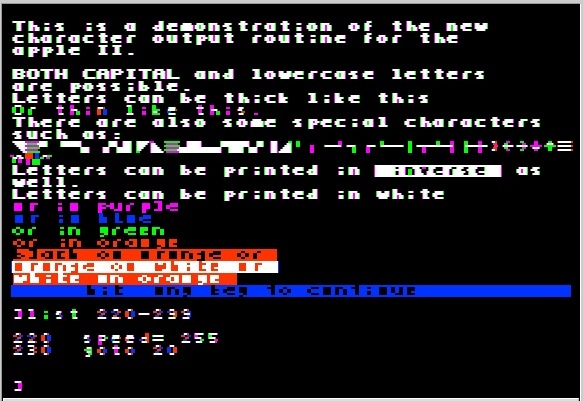
HRCG in color
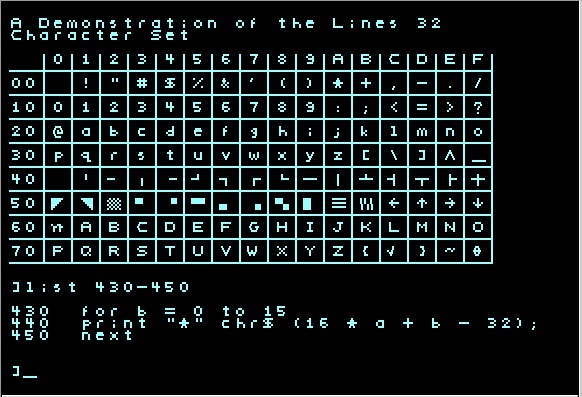
the full character set in mono
I now have a //e, //c, and IIGS.
I have made these other pages of interest to the Apple ][ community:
My file extraction script, written in Perl. It reads a DOS 3.3 disk image (in a binhex-sort of format), locates individual files and de-tokenizes them. In order to do this it needs to know the 6+2 nybble conversion, sector interleaving, how to locate D5-AA-96 at the beginning of each sector, and token tables for both types of BASIC.
My Peeks, Pokes and Calls collection
Some Bug Reports and Questions
Q: I got the error: $ xapple2 Warning. Cannot open the .apple2 system defaults file. Make sure it's readable in your home directory.Press RETURN to continue...
A : .apple2 is a file that you would put in your home directory. It is a text file, similar to .login and .bashrc. You can use any text editor to create it. The more important question is what to put in it. Again, you'd have to find the xapple2 documentation.
xapple2 was developed by multiple people, and I did not work with it enough to understand all of the things that it does. Also, my use of xapple2 ended in 2002 as I was transitioning over to Mac OS X.
Q: I got the error: ioperm: Operation not permitted cannot get port access to PC speaker. sound will not be used.
A : "cannot get port access to PC speaker" is a common message, and the only way to avoid it is to either use the Sun audio sound driver, as I did, or to run xapple2 as root. xapple2 tries to produce sound the old fashioned way, by toggling a single-bit output port that is connected to a speaker on most compliant Intel-based PCs. This is similar to the speaker hardware on an actual Apple II. However the PC is so fast compared to the Apple II that the sound comes out wrong. My patch (which is only applicable to version 0.7.4 of xapple2) addresses it by measuring the number of cycles used by each 6502 instruction and writing a reconstructed waveform to the sound driver.
Q: I got the error: Sorry bud, xapple2 only supports 8bit PseudoColor displays. Maybe you can fix this!
A : 8bit pseudocolor has to do with how it communicates with the X window server. Pseudocolor means you can set specific pixel values to have specific colors. I modified the color table to accurately model the Apple II's output and how it is transformed by a compliant NTSC modulator and tuner. However the error you're getting is because you have your display set to 24-bit color or something like that. See if there is a way to set your display to 256 colors.
Footnotes
1 : I also found something at geocities.ws/how_chee. Go to the section titled "xapple2" near the bottom. I'm not sure if this is the same source code or whether my patchfile will work with it.
This page was written in the "embarrassingly readable" markup language RHTF, and was last updated on 2019 Dec 14.
 s.27
s.27